Estimate drafts from your notes
Voice memos, photos or scribbled walkthrough notes turned into a clean line-item estimate in your format.
You: check the numbers, adjust, send.
For residential builders and remodelers
We set up AI to draft your estimates, change orders, invoices and client updates inside the tools you already use. You review, you approve, it goes out.
Built by a working residential builder. Nothing goes out without your OK.
The problem
You didn't get into building to do paperwork at the kitchen table. But when you're the owner, that's where the estimates, change orders and follow-ups get done, usually after dinner, usually late.
None of it is hard. It's just constant, and when it slips, it costs you: a change order that never got signed, a lead that went to the next guy, a draw that went in a week late.
How it works
We build the workflows into the email, accounting and file tools you already have, then hand you the keys.
Choose the three jobs that eat the most of your week from the menu below. Not sure? We'll help you pick based on where your time actually goes.
We build them inside the tools you already use. No meetings needed.
The AI drafts, you check it and hit send. As your business changes, we keep the workflows tuned so they stay useful.
The workflow menu
Voice memos, photos or scribbled walkthrough notes turned into a clean line-item estimate in your format.
You: check the numbers, adjust, send.Describe the change in a text or email. Get a written change order with scope, price and schedule impact, ready to sign.
You: confirm scope and price before it goes out.Supplier and sub invoices pulled from your inbox, matched to the right job and cost code, and staged in your books.
You: approve before anything is entered or paid.A short, plain update for each client: what got done, what's next, what you need from them. Written in your voice.
You: read it over Friday morning and send.New inquiries and missed calls get a same-day reply drafted, plus reminders so no lead sits for a week.
You: approve the reply, make the call.New subs get your packet: W-9, insurance certificate request, agreement and job details, with tracking on what's missing.
You: sign off before a sub starts work.Need something that isn't on the list, like draw requests or job cost reviews? Ask. If it's repetitive and lives in your email or books, it can usually be set up.
What's inside the kit
Price it, track it, change it in writing, bill it on time. The templates share cost codes, so the numbers move from bid to closeout without retyping.
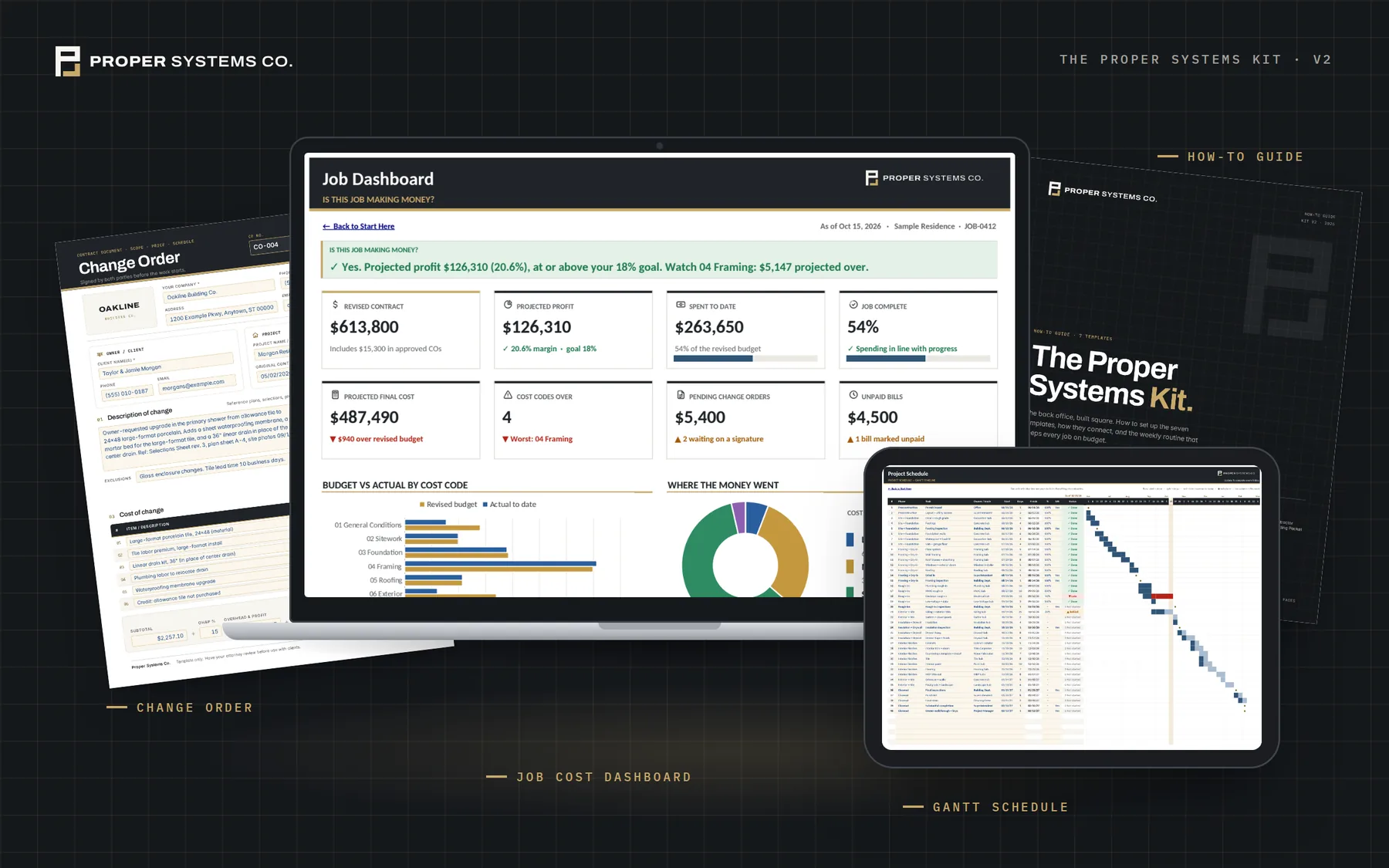

Price every line by cost code with labor, material and sub split out. Markups, tax and allowances figured for you, plus a client-ready proposal.
Excel / Google Sheets · Sample + Blank · Dashboard
Budget vs. actual by cost code. Log bills and commitments, and see projected profit and the codes running over every week.
Excel / Google Sheets · Sample + Blank · Dashboard
Draw stages, retainage, change orders and payments in one place, with a dashboard of who owes you and how late.
Excel / Google Sheets · Sample + Blank · Dashboard
Every client decision with a decide-by and order-by date. Allowance vs. actual, with overages ready for a change order.
Excel / Google Sheets · Sample + Blank · Dashboard
Week-by-week Gantt for phases, tasks, inspections and milestones. Late and behind tasks flag themselves.
Excel / Google Sheets · Sample + Blank · Dashboard
Two-page change order. The fillable PDF totals the line items and shows the revised contract sum. Filled-in example included.
Fillable PDF · Printable PDF · Word
Seven pages: welcome, info form, W-9 request, insurance, jobsite rules, pay terms and sign-off. Send it before day one.
Fillable PDF · Printable PDF · WordEverything you need to be running in an hour.
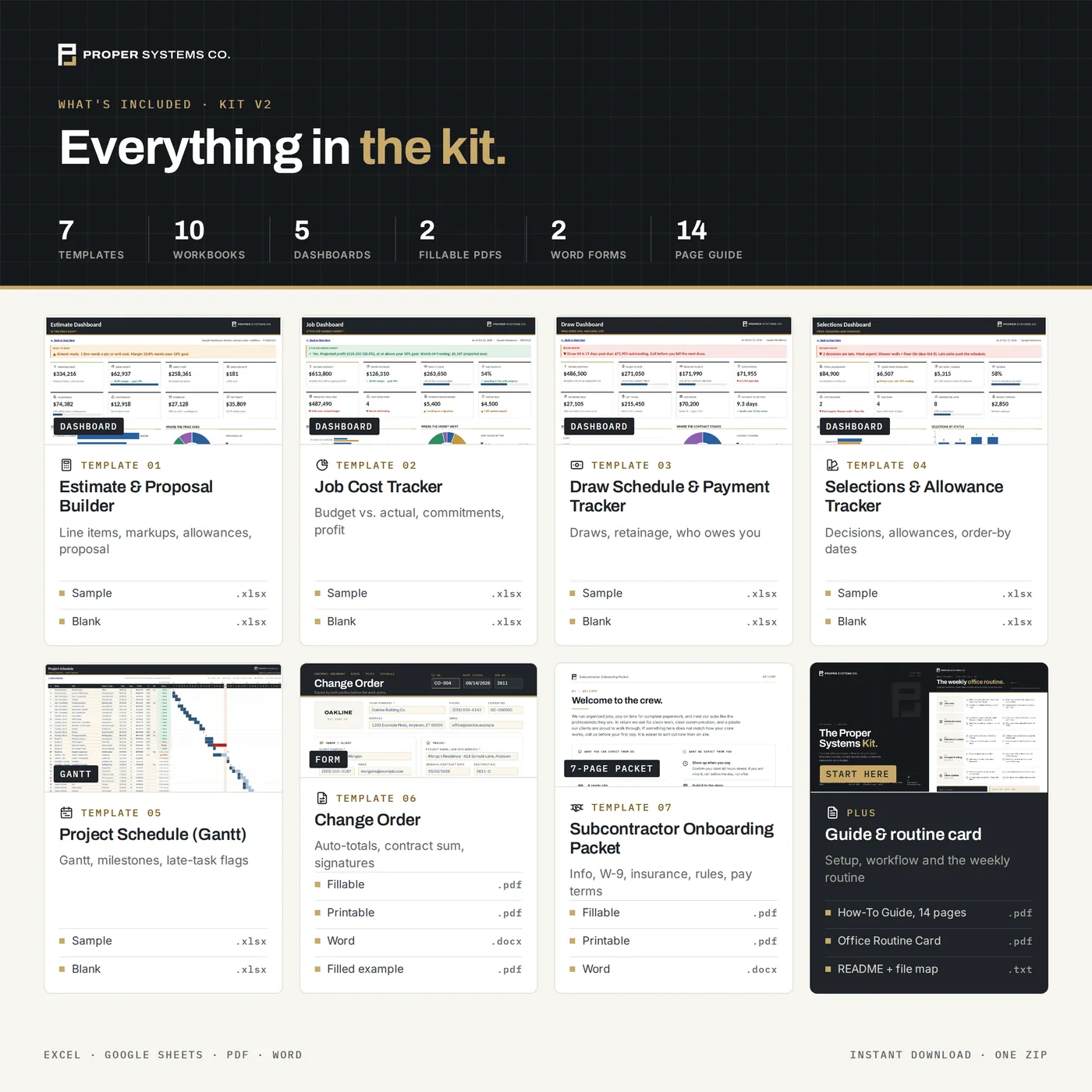
One zip, three folders: Start Here, Spreadsheets (Sample and Blank), Forms (fillable, printable, Word, example).
Pricing
Flat prices, written down. No per-seat fees, no long contracts.
Two templates, instant download.
One-time. Templates you set up yourself.
One-time. We do the setup for you.
3-month minimum, after setup.
Launch pricing for our first 10 clients. Prices go up after that.
The guarantee
We'd rather refund you than have you paying for something that doesn't pull its weight.
How we keep it honest
This is a drafting assistant, not an autopilot. It does the typing. You make the calls.
Estimates, emails and change orders show up as drafts. Nothing reaches a client, sub or lender until you look at it and say go.
Everything runs inside your own email, accounting and file accounts. We don't copy your data into ours.
You pay for your own Claude plan and the software you already use. We tell you what that runs before you buy anything from us.
FAQ
Something else on your mind? Email hello@propersystemsco.com and you'll hear back from a person.
No. If you can read an email and click send, you can run this. We do the setup, and the guide and walkthrough show you exactly what to click, using your own screens.
The tools most small builders already use, like QuickBooks and Google or Microsoft email, plus shared drives and many common project management tools. On the call before setup, we'll confirm your setup is a fit before you pay.
Your own Claude plan, paid directly to Anthropic, plus the software you already pay for. The setup is a one-time fee. The managed plan is optional at $350 a month if you want us to keep things tuned and add new workflows.
Your data stays in your own accounts. We set things up inside them and don't store your jobs, clients or financials on our side. You control access and can remove ours any time.
Then you get your money back. If the setup doesn't save you 5 hours a week within 60 days, we refund the setup fee.
One optional 30-minute call before setup so we understand how you work. Everything after that is written or recorded, so you can go through it on your own time.
No. Every workflow is set up to draft, not send. You review and approve anything that goes to a client, sub, supplier or lender.
A residential builder who still runs jobs. These are the same workflows we set up for our own company because we got tired of doing paperwork at midnight.
Free starter pack
Free, no call required. They come straight out of the full kit, and they're the same ones the workflows are built around.
Download it right away. No spam, unsubscribe anytime.